Hi, I have created a geometry with many facets (opacity 0) that only act as probe plane to be able to calculate locate pressure profiles. I started with visualizing the pressure values using the profile plotter, but this is not that helpful since the axis has different amount of point and different length scales for the different facets on purpose. Therefore I want to export the data to do some post-processing and making graphs myself. I know I can export data from the profile plotter (either “copy to clipboard” or “save file”), but this is a bit clumsy since I have many facets and it takes some time to add all the curves one by one to the plotter. Therefore I tried something else: just select all facets in one go and then use “File” → “Export selected profiles”. This works fine. However, I noticed a factor 2 discrepancy between the values in the csv from “export selected profiles” compared to “export profile plotter”. Is this factor 2 there “by design”? What is actually the physical unit used in the “export selected profiles” csv?
Here an example of one facet with 10 points.
| F#629 - “profile plotter export” | 629 - “export profile” | ratio | |
|---|---|---|---|
| 2.11E-10 | 5.49217E-11 | 3.84 | |
| 2.04E-10 | 9.19626E-11 | 2.21 | |
| 2.05E-10 | 1.128E-10 | 1.82 | |
| 2.05E-10 | 1.24271E-10 | 1.65 | |
| 2.02E-10 | 1.27494E-10 | 1.58 | |
| 2.03E-10 | 1.28292E-10 | 1.58 | |
| 2.04E-10 | 1.2332E-10 | 1.65 | |
| 2.04E-10 | 1.1235E-10 | 1.82 | |
| 1.99E-10 | 8.99716E-11 | 2.21 | |
| 2.06E-10 | 5.35753E-11 | 3.84 | |
| average | 2.04E-10 | 1.02E-10 | 2.00 |
Morever, if I look at “facet details”, it gives me the 1.02e-10 mbar value. So I am a bit lost which value I should take as “pressure”… I am using MolFlow 2.11.1

Hello Joop!
First the question about the unit - the values for pressure are represented in mbar in all the methods you chose (profile plotter export, Export selected facets, Facet details window).
Second - the value you see in the Facet details is correct, and in the example you sent you can see it’s equal to the average of the export profile column. Since the Facet details window shows only one value per facet, it is indeed the average facet pressure (unlike the profile where you can split the facet into multiple slices and see the pressure for each one).
Third - the two profile export methods should indeed be equivalent (as I just verified on my side for a simple example). One reason for the difference comes to mind - the Export selected profiles menu option exports only the values for pressure. The profile plotter on the other hand will export the values for whatever is currently plotted (meaning whatever “mode” you choose in the Display as dropdown). Make sure you choose Pressure (mbar) from the dropdown. If this still gives different results, could you please share the example so I can debug it?
Cheers!
I checked your suggestions (I am really looking at Pressure (mbar) in the profile plotter). Since I cannot share the real model, I made a simple tube which shows the same discrepancy. In the Excel you can see the result of different exports. Maybe I do something wrong with making the “pressure probe” facets double-sided with opacity 0, but still the result is rather confusing. Generated with Molflow 2.11.1.
simple_tube_export.xlsx (236.6 KB)
simple_tube.zip (142.9 KB)
I digged into the molflow source code and I think I found at least where part of the discrepancy is coming from:
It seems the File → “Export selected profiles” ends up in the piece of code around line 788 in MolflowGeometry.cpp:
788: scaleY = 1.0 / (f->GetArea() * CM2_TO_M2 / (double)numSlices) * mApp->worker.model->sp.gasMass * G_TO_KG / AVOGADRO_CONSTANT * PA_TO_MBAR;
792: line << prof[j].sum_v_ort * scaleY << sep;
I think I read here it does not take the actual area per slice, but instead just takes the total area of the facet and divides by the number of slides. As you can see in my example, I used a circular facet which is sliced in one direction, so the area per slice is not a constant.
The profile plotter uses a different routine, as can be found in ProfilePlotter.cpp:
line 292: double sliceArea_m2 = f->profileSliceAreas_cm2[j] * CM2_TO_M2;
Here the individual slice area’s are used correctly.
I checked my results and this indeed explains the differences I see in the circular facet. I do have the remaining factor 2 discrepancy, I am digging further in the code to find out where that comes from (maybe because I made my “probe facet” double sided?).
Please let me know if you agree with the above.
I found the factor 2 as well. It is actually caused by the same piece of code. As you can see above, File → “Export selected profiles” uses f->GetArea(). This is defined in CSVExporter.cpp, line 85:
double GetArea(const SimulationFacet &fac) {
return fac.sh.area * (fac.sh.is2sided ? 2.0 : 1.0); }
So, if the facet is double sided, it will return double the area of the facet.
I do think (as also shown in the tutorial: https://www.youtube.com/watch?v=ZJAipANsdNA), I should make my “pressure probe facet” double sided, so I will leave it like this.
In conclusion: I think the pressure calculation in the profile plotter is correct, so I will use those results.
Dear Joop,
Great job on debugging! I did not manage to verify in detail yet, but I believe you are right - the way the area is obtained is likely the cause of the problem.
Looking at the code, I would also agree that exporting from the profile plotter is the correct method, since the export function in that case simply copies the plotted data.
I will check again tomorrow so that I can confirm for sure.
Cheers!
Hello again!
I managed to take a better look at this.
Your analysis about the general difference in the two export methods is correct - the Export selected profiles option does indeed split the whole area into equal-sized slices, while profile plotter uses the actual slice size.
However, the average of the exported values should be the same in your case, and should equal the average pressure on the whole facet (shown in Facet details). The profile plotter produces the same value per slice (within a certain difference acceptable for a Monte-Carlo simulation). The Export selected profiles option will result in smaller values for the “outer” slices, but the values increase as we reach the “inner” slices (outer slices are smaller and receive less particles, but in this export method they are not scaled by their actual area to obtain the real pressure; same goes for inner slices, except they receive more particle hits). Additionally, the profile plotter slice areas are also multiplied by 2 in the case of double-sided facets, so this does not cause the “factor 2 discrepancy”. I tried your example with several slice-number setups and always received the same average for both export methods.
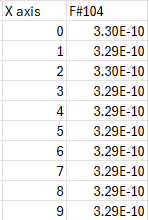
Looking at your example, I could not export the same values from the profile plotter as the ones you attached in the excel. What I got from the profile plotter is in the image I attached, which averages to 3.29e-10 (the same average as the Export selected profiles menu).
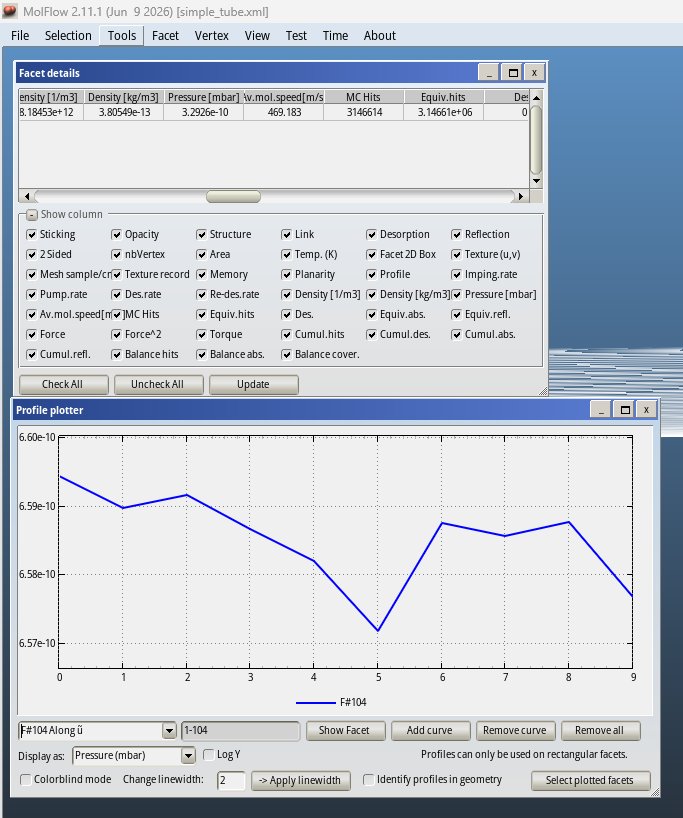
That is certainly strange… This is my view in Molflow: profile plotter showing facet #104 at average pressure of 6.58e-10 mbar, while facet average pressure in “facet details” shows 3.29e-10 mbar. I did not change anything to my project file compared to yesterday. Might it be caused by different versions of Molflow?
I do think it is a versioning issue:
- molflow_v2.11.1 links to this version of shared code repo Files · f2bcf81f34f44a79e2504ae4e8ce1dfacd7f5352 · molflow_synrad / shared_code · GitLab
- In this version of shared code repo, I find in “Facet_shared.cpp” the calculation behind the slice areas that is used by ProfilePlotter. line 688 of “Facet_shared.cpp”:
profileSliceAreas_cm2[j] = A * uNorm * vNorm;
- In the master of shared code repo, this line of code has been changed:
-
profileSliceAreas_cm2[j] = A * uNorm * vNorm * (sh.is2sided ? 2.0 : 1.0);
-
This is the commit: normalize 2-sided facets’ profile area by 2 (f7c2c801) · Commits · molflow_synrad / shared_code · GitLab
So, that explains why I see in the profile plotter of v2.11.1 the pressure 2x higher, it does not use double of the slice area.
Which version of Molflow do you recommend to use instead?
@ptrifuno Petar, please see this: Use molflow 2.11.1 benchmarking :base pressure higher than Paper - #7 by maarton
Dear Joop,
You are right once again. I was debugging using the current master branch of the source code which includes the fix for this, instead of the official 2.11.1 release, my bad! More details about the problem can be found in the link posted by Marton.
Until the next official release is out, you can use the current version on the master branch from this link - go to build-artifact-windows and then find the Download button on the right side.
Thank you very much for the clarification! Looking forward to the next release and in the mean time I will follow your suggestion.
Hello again, Joop!
A couple of things that might be helpful in general for the problem:
-
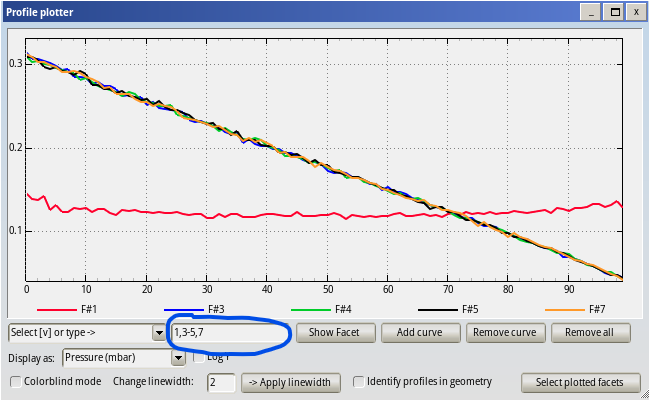
You can quickly add multiple curves to the profile plotter by typing facet IDs in the text box highlighted in the image below. You can type a sequence of IDs separated by a comma, or use a dash to specify a range.
-
Another tool you can use is the texture extraction (
Tools->Texture extractionin the menu). There you can extract simulation results (pressure, among other) from the textures of facets, plot multiple curves with different numbers of points and choose different modes for scaling the X axis. You can find more information here, but let me know if you need any help. -
Thank you again for identifying and debugging the problem. As explained, a part of it was already solved on the master branch (the double-sided facet), but we also added a fix to use proper profile slice area when exporting through the menu option (available here) and we will add it to the next release which will come soon.
Cheers!
Thanks! In general, working a lot with Molflow in the last weeks, I am quite amazed with the flexibility of the Molflow GUI  .
.